


Times Tables - Multiplication
4.545.00 Reviews
App Specs
- Version
- 2.4.9
- Updated On
- License
- Free
- Downloads
- 1,000,000+
- Developer
- BrainSoft Apps
- Categories
- Educational
- Platform
- Android
Screenshots
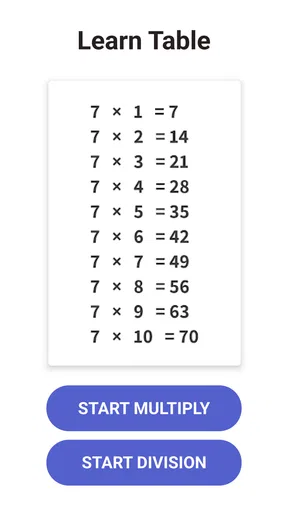
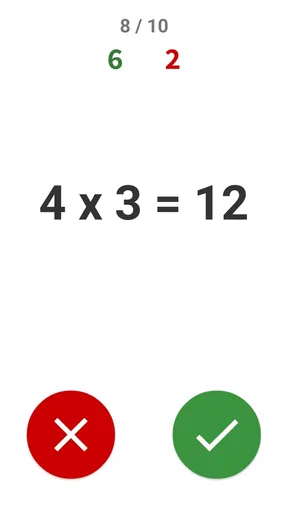
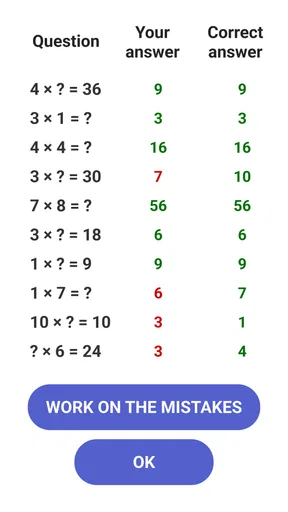
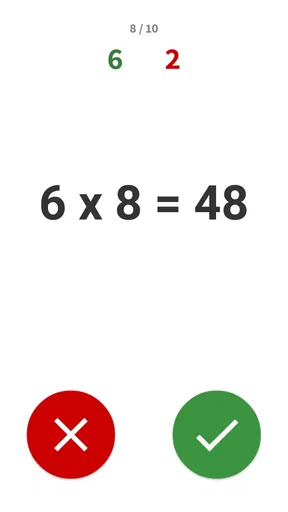

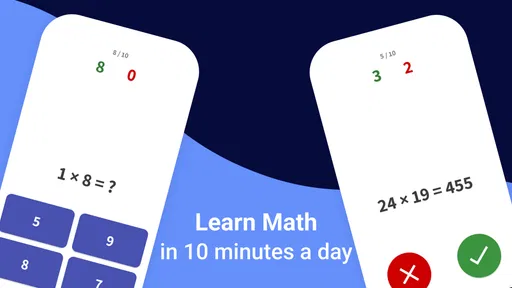


 Analysis by AppCompare
If you've ever been on a quest to make learning multiplication fun and easy, then you might want to check out the app Times Tables - Multiplication. As someone who remembers the struggle of memorizing those endless multiplication charts, I was curious to see how this app could change the game for both kids and adults alike.
Who will get the most from it?
I’d consider this educational game for a child who already recognizes multiplication as repeated addition but needs regular practice recalling answers. That distinction matters: a quiz can strengthen memory, but it is not a substitute for explaining why, say, four groups of six make twenty-four. I’d pair the game with objects, drawings, or a short conversation when a learner is first meeting the idea, then use quick rounds to help the facts stick.
It can also suit a parent who wants a focused activity for a short break at home, or an adult who wants to revisit basic times tables without turning the exercise into a formal lesson. BrainSoft Apps has kept the central purpose narrow, which I see as a strength when the goal is multiplication practice rather than a broad course covering every part of school math.
A practical routine is to let the learner choose one table to revisit, play for a brief spell, and then ask them to explain one answer aloud. That last step helps reveal whether a correct response came from understanding or a lucky guess. I would avoid making speed the only measure of progress, especially for a child who is still building confidence.
First Impressions
Upon opening the app, I was greeted with a bright, colorful interface that immediately sets a welcoming tone. It's clear that the developers put a lot of thought into making it visually appealing without going overboard. The simplicity of the design makes navigation a breeze, even for younger users.
The home screen offers a variety of options, from practicing specific tables to engaging in timed challenges. This flexibility is fantastic because it allows users to focus on areas they need to improve or to test their speed and accuracy.
A useful place in a child’s routine
The choice between targeted practice and a timed challenge gives families a way to match the activity to the moment. After homework, for example, a learner who is tired may benefit more from calmly reviewing one table than from being asked to beat a clock. On another day, a short timed round can add variety once the answers are familiar. I’d treat the timer as an optional challenge, not as proof that a child has mastered the subject.
Worth Reading Before You Choose

EA SPORTS FC Mobile 26 Is a Bigger Football Game, but It Takes Time

Flipboard Shows What News Apps Must Do Beyond the Feed

Switching to Android Auto Means Rethinking Your Driving Routine

Google Calendar Makes a Crowded Week Easier to Manage

Ludo King Makes the Most of the Minutes Between Plans

Baby Panda World Brings Quick Play to Modern Phones, but Its Game Library Feels Busy
For a realistic everyday use, imagine a child waiting while a parent finishes a small household task. A few minutes with multiplication questions can turn that gap into practice without requiring a workbook and pencil. When the child gets stuck, I’d pause rather than supplying the answer immediately: ask them to work it out using a known fact, such as doubling a nearby multiplication result. That keeps the activity connected to reasoning instead of pure guessing.
The app is free to download, and its Everyone age rating makes it suitable for a broad audience. There are in-app purchases, with items ranging from $0.99 to $19.99, so I’d check the purchase options with a child before handing over a device. The free entry point lowers the commitment, but it is still sensible to establish whether paid extras are acceptable in your household before practice becomes part of a routine.
Features that Stand Out
One of the standout features of Times Tables - Multiplication is its interactive learning approach. Rather than just presenting the tables in a static format, the app includes various games and quizzes that make learning dynamic and engaging. There’s something incredibly satisfying about seeing those correct answers stack up.
The app also offers a personalized learning experience. As you progress, it tracks your performance and adjusts the difficulty accordingly. This adaptive learning feature ensures that you’re constantly challenged without feeling overwhelmed.
For parents and educators, there’s a handy progress tracker. This allows them to monitor how well students are doing and identify which tables might need more work. It’s a great way to stay involved in the learning process without having to hover over the learner’s shoulder.
How I’d use its progress signals
A progress tracker is most useful when it changes what you do next. If a learner repeatedly hesitates on one table, I’d make that the next short practice target rather than restarting every table from the beginning. If a score improves, I’d still check whether the child can answer the same fact later without relying on the game’s immediate rhythm. That simple follow-up can separate durable recall from a good run in one session.
There is a trade-off with adaptive difficulty: it can keep practice at a comfortable level, but a learner may not always know why the questions have changed. I’d occasionally ask what feels easy or difficult and let that feedback guide the next session too. An app’s adjustment is helpful, but it does not replace an adult noticing frustration, boredom, or a concept that needs explaining in a different way.
Usability and Accessibility
In terms of usability, the app is straightforward. The menus are intuitive, and the instructions are clear, which is crucial for maintaining user engagement. I found that the app runs smoothly on both Android and iOS devices with minimal glitches.
Accessibility is another area where the app shines. It’s designed to cater to a wide range of users, with options to adjust the font size and contrast for those with visual impairments. Plus, the audio cues are clear and supportive, which is a nice touch for auditory learners.
Choosing between this and other ways to practise
Compared with a printed times-table chart, the game offers active answering rather than simply looking up a result. A chart can be better when a learner needs to see patterns across a whole table, while answering questions is more useful for testing recall. I’d use the two for different jobs: a chart to explain and compare, and this game to practise remembering.
Compared with a general math-learning app, this title has a narrower focus. That is useful if multiplication facts are the specific sticking point and a child does not need to navigate lessons on unrelated topics. If the real difficulty is understanding fractions, place value, or how to set up a word problem, a broader learning resource or direct teaching will be a better fit. Likewise, a paper exercise may suit someone who needs to practise showing working, rather than selecting answers in a game.
There is also a difference between game-based repetition and tutoring. The app can make repeated practice more inviting, but a person can respond to a learner’s question in a way a quiz cannot. When a child keeps making the same mistake, I’d use the game to spot the pattern and then step in with a concrete explanation, rather than simply asking for more rounds.
Practical limits to keep in mind
The focused subject is also its main limitation: this is not a complete math curriculum. Someone looking for lessons that build from basic number sense through multiple topics may outgrow it or need another resource alongside it. Even for multiplication, a game should not be the only method if the learner needs help understanding the underlying operations or practising written calculations.
Timed activities can be motivating for some children and uncomfortable for others. If speed causes stress, I’d favour untimed practice and praise careful thinking instead of rushing. Similarly, rewards and streaks can make repetition feel satisfying, but they should support learning rather than become the only reason to continue. A short session that ends while the learner is still engaged is often a better choice than pushing through frustration.
One useful habit is to alternate familiar facts with the ones that need work. If every question is difficult, practice can feel discouraging; if every question is already easy, it may not stretch recall. A parent can use the performance information to choose a reasonable focus, then check whether the learner can explain a tricky answer in their own words. This gives the game a role in a wider routine without turning the routine into a complicated tracking project.
The Fun Factor
What really sets Times Tables - Multiplication apart is its ability to make learning fun. The games are not only educational but also genuinely enjoyable. Whether it’s racing against the clock in a timed challenge or earning rewards for streaks of correct answers, there’s a constant sense of achievement.
The app includes a variety of mini-games, each designed to reinforce multiplication skills in different ways. It’s like having a digital playground where learning is the main activity, and honestly, who doesn’t love a good game?
Enjoyment is valuable because it can make a learner more willing to return to practice, but I would not assume that a child who likes a mini-game has automatically learned every fact. I’d occasionally move away from the screen and ask a few questions in a different order. If the answers still come readily, that is a more useful sign of recall than success tied to one familiar game format.
Cost, device fit, and switching later
The game is free, with optional in-app purchases. The sensible way to approach that arrangement is to try the available experience first and decide whether it fits the learner before spending anything. I would also make clear that paid items are optional, so the child does not mistake a purchase prompt for a required step in learning multiplication.
It is available for Android devices running at least version 6.0, and the current version is 2.4.3. It has an average rating of 4.5 from around 12,000 ratings and has been installed over a million times. Those figures suggest that many people have tried it, but they cannot tell me whether its style suits a particular child; a short trial with a real practice goal is still the best test.
If the learner later needs a different approach, switching is straightforward in educational terms: keep the same target facts and practise them with a chart, flashcards, spoken questions, or a broader math resource. The useful thing to carry over is the learner’s list of confident and uncertain tables, not dependence on one interface. That way, moving to another tool does not mean starting the learning process from scratch.
Final Thoughts
All in all, Times Tables - Multiplication is a fantastic tool for anyone looking to master multiplication tables. Its engaging approach, combined with adaptive learning and user-friendly design, makes it a standout choice in educational apps.
Whether you’re a parent looking to make math less daunting for your child, or an adult wanting to brush up on your skills, this app offers something valuable. It reminds us that learning doesn’t have to be a chore; it can be a fun and rewarding journey. So, if you’re ready to turn those multiplication woes into wows, give this app a try. You might just find yourself enjoying math a whole lot more!
Pros
- Engaging interface for young learners.
- Adaptive difficulty levels enhance learning.
- Tracks progress with detailed reports.
- Offers fun games to reinforce skills.
- No internet required for offline use.
Cons
- Limited to multiplication; lacks division.
- Ads can interrupt the learning flow.
- Some features behind a paywall.
- Graphics may seem basic to older kids.
- Lacks multiplayer mode for group play.
FAQs for Times Tables - Multiplication
What is Times Tables - Multiplication app, and how does it work?
Times Tables - Multiplication is an educational app designed to help users learn and master multiplication tables. The app offers interactive exercises, quizzes, and games to reinforce learning. Its user-friendly interface and engaging design make it suitable for a wide range of ages, from children to adults who want to brush up on their skills.
Is the Times Tables - Multiplication app suitable for all age groups?
Yes, the app is designed to cater to various age groups, making it ideal for children just starting to learn multiplication, as well as adults who need a refresher. The app offers different difficulty levels and customizable settings to adapt to the learner’s pace and proficiency.
Does the app require an internet connection to function?
Times Tables - Multiplication primarily functions offline, allowing users to access content without an internet connection. However, certain features, such as updates or additional content downloads, might require internet access. This makes it convenient for on-the-go learning without the need for constant connectivity.
Are there any in-app purchases or ads within the Times Tables - Multiplication app?
The app may include in-app purchases to unlock additional features or content. It might also display ads, although these are usually non-intrusive. Users can often choose to purchase an ad-free version to enhance their learning experience without interruptions.
How can I track my progress in the Times Tables - Multiplication app?
The app features a progress tracking system that records user performance on quizzes and exercises. It provides feedback and detailed reports, allowing users to monitor their improvement over time. This feature helps users identify areas for improvement and set personalized learning goals.


